Development October 26, 2026
Alfatech Modbus Configurator
White Paper · Mobile configuration and licensing for elevator controllers
Overview
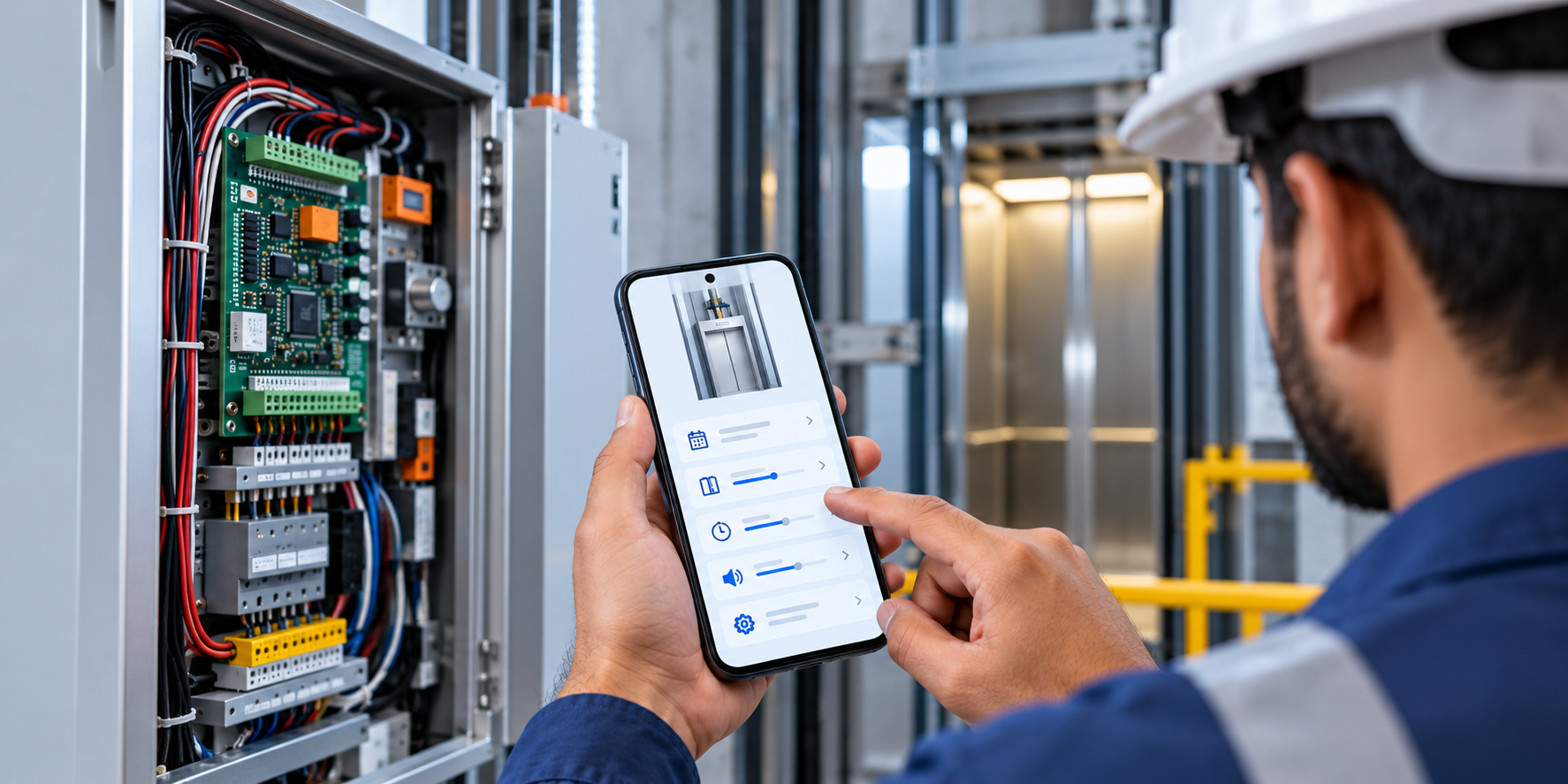
The Alfatech Modbus Configurator is a mobile app that lets technicians and dealers set up elevator
controllers directly from a phone. It replaces manual, on-panel configuration with a guided interface that
reads and writes the controller's settings over the Modbus RTU protocol, and it adds secure, offline licensing
so the manufacturer stays in control of who can configure a lift and for how long.
How It Worked Before
Previously, the manufacturer configured the entire controller board at the factory before dispatch. If anything
needed to change on site — a floor count, a door delay, a display setting — a technician had to physically
connect to the board over USB with the manufacturer's tooling. Once a board was installed, the manufacturer
had no practical way to enforce payment: if the board was not paid for, there was nothing they could do from
a distance.
The Problem
• Factory-only configuration. Every board had to be fully set up by the manufacturer, and any later
change meant a USB connection and a site visit.
• No leverage on unpaid boards. After installation, the manufacturer could not stop or restrict a lift whose
board had not been paid for.
• No control over access. Nothing limited who could change settings, or for how long.
• No connectivity on site. Machine rooms and shafts often have no mobile data, so server-based licensing
is impractical.
• Diverse field teams. Many technicians are more comfortable in Hindi than in English.
Our Solution
A single Flutter application, shipped as two builds — a Master app for the manufacturer and a Dealer app for
distributors — that connects to the controller, authenticates with the device password, and presents every
setting as a clear form. All Modbus logic (frame building, CRC-16 checks, polling, response parsing) sits
above one transport boundary, so new connection types plug in without touching the rest of the app.
Key Capabilities
1. Full controller configuration
Reads the controller's registers into an editable dashboard and writes changes back. Covers floor setup, door
and timing settings, halt mode (Stop, Slow or Random Call), display segments, fire and welcome floors,
volume and more. Each write is confirmed by polling the controller until it acknowledges.
2. Offline authentication
Access is granted by a cryptographically signed activation key. The key carries the company, dealer ID,
dealer name, a unique key ID and an expiry time. The app verifies the signature locally — no internet, no
server call — so it works in a basement machine room. Master and Dealer builds use separate signing keys,
so a dealer key cannot unlock the manufacturer app.
3. QR code generation and scanning
Activation keys are issued as high error-correction QR codes that can be shared over WhatsApp, email or
any messaging app. The receiving technician scans the code with the camera or imports a screenshot from
the gallery; no long key needs to be typed.
4. Limited validity
Every key is time-bound. The issuer picks a window — 30 minutes, 1 day, 2 days or long-term — and the app
checks the expiry on every launch, locking configuration once it lapses.
5. Stop date for unpaid boards
The manufacturer (Master) and the dealer can each set a stop date that is stored on the controller itself. The
controller keeps track of it with no connection needed. Once that date passes, the lift goes into the configured
halt mode: Stop, Slow or Random Call. When payment is received, the controller shows an error code. The
issuer turns it into a short 12-character code tied to that specific unit and a new date. The technician enters
this code to release the lift or extend the date, with no USB and no factory visit.
6. Multilingual interface
The full interface is available in English and Hindi. Users choose a language on first launch or switch from
the home screen at any time; the choice is remembered across sessions.
7. Diagnostics and testing
A live diagnostic screen polls the controller once per second and shows status bits and error states, and a
testing-calls function lets a technician exercise the lift from the phone during commissioning.
From WiFi to Bluetooth
The first versions connected through a WiFi module on the controller: the phone opened a TCP connection
(Telnet port 23) and sent raw Modbus RTU frames. This worked, but required the WiFi module and a stable
network on site. In mid-2026 we added Bluetooth Low Energy support for the low-cost HM-10 module on
Android, so a technician can now connect with no network at all.
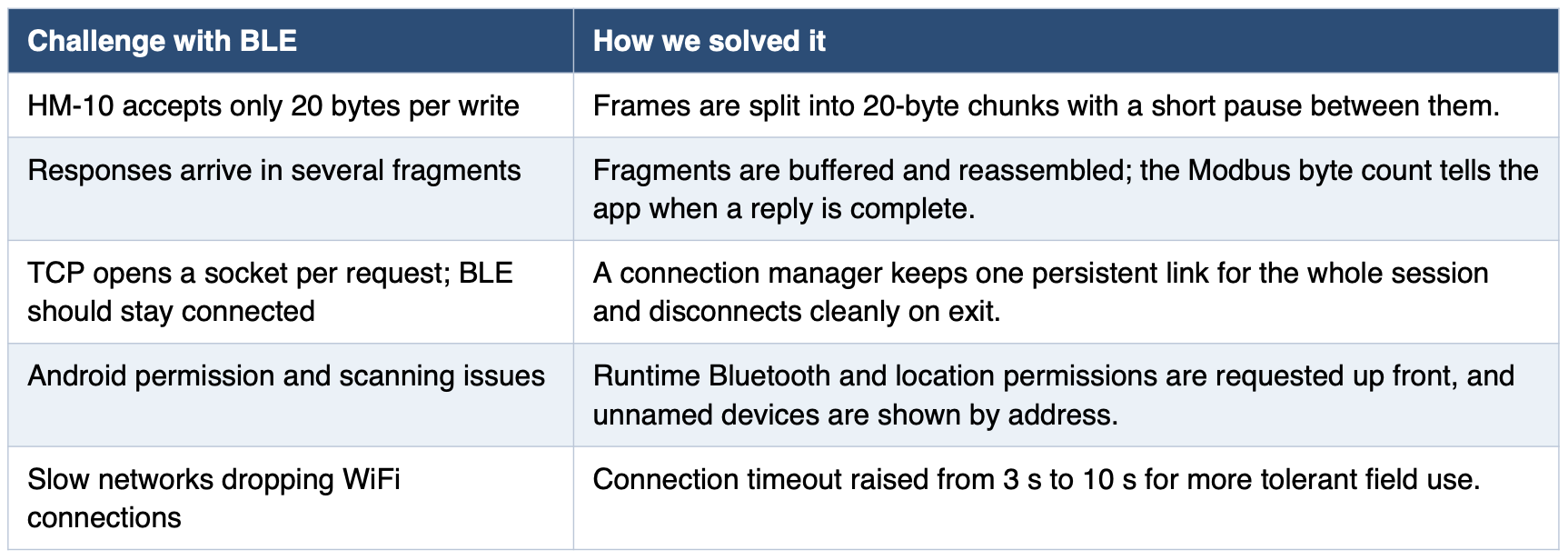
Users pick WiFi or Bluetooth from the dashboard; everything after connection — password, configuration,
diagnostics — works identically on both.
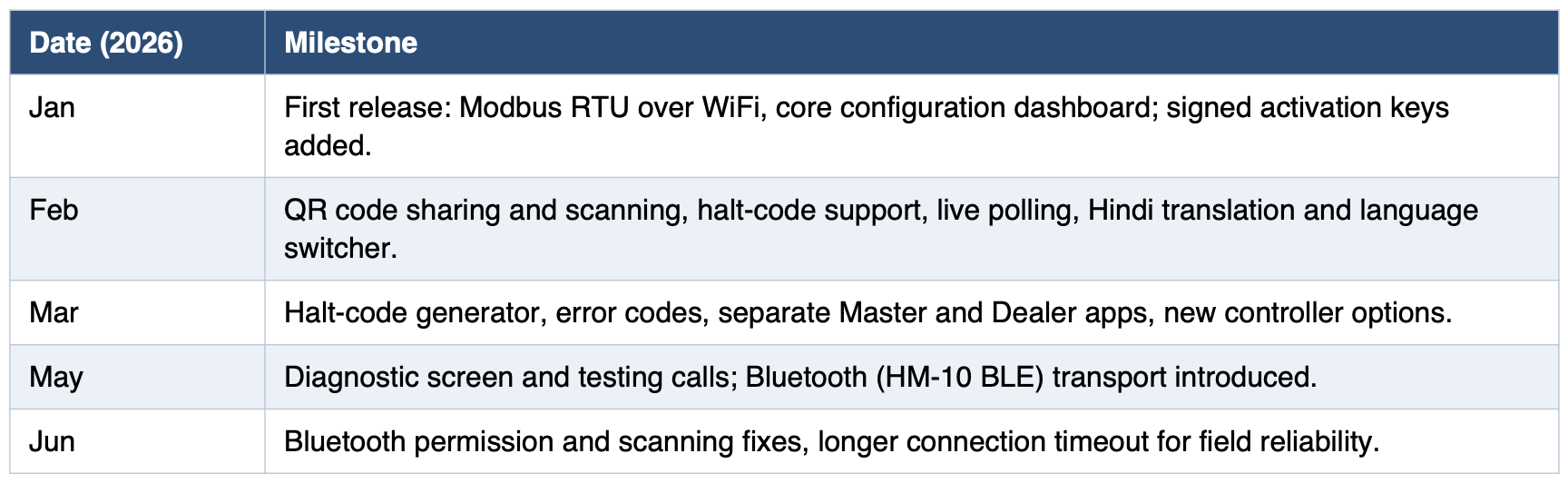
Development Timeline
Outcome
The configurator replaces factory-only setup and USB changes with a guided mobile workflow. Controllers
are configured on site in minutes, unpaid boards can be halted and released through a stored stop date,
access is limited to authorised people for a set period, licensing works without internet, and technicians can
connect over WiFi or Bluetooth in their preferred language.